- Welcome to AHXproject.
AHXproject
< | >
Recent posts
#11
Ubuntu News / OpenShot video editor is now ...
Last post by tim - Sep 23, 2026, 02:25 AMOpenShot video editor is now available as a snap
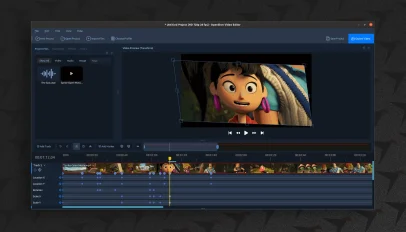 The OpenShot video editor is now available on the Canonical Snap Store. An official snap package of the Qt-based editing tool went live today (22 September). The new snap is already available to install via App Center on all supported Ubuntu releases, though a Deb package is carried in the Ubuntu archives so two results appear in search: Adding a snap package will make it easier for Ubuntu users to install the video editor. It also makes newer versions available to users on older Ubuntu LTS releases, whose Qt versions may prevent them from using the official PPA packages. The [...]
You're reading OpenShot video editor is now available as a snap , a blog post from OMG! Ubuntu . Do not reproduce elsewhere without permission.
Categories: News, openshot, Snaps
Source: https://www.omgubuntu.co.uk/2026/09/openshot-video-editor-snap Sep 23, 2026, 01:09 AM
The OpenShot video editor is now available on the Canonical Snap Store. An official snap package of the Qt-based editing tool went live today (22 September). The new snap is already available to install via App Center on all supported Ubuntu releases, though a Deb package is carried in the Ubuntu archives so two results appear in search: Adding a snap package will make it easier for Ubuntu users to install the video editor. It also makes newer versions available to users on older Ubuntu LTS releases, whose Qt versions may prevent them from using the official PPA packages. The [...]You're reading OpenShot video editor is now available as a snap , a blog post from OMG! Ubuntu . Do not reproduce elsewhere without permission.
Categories: News, openshot, Snaps
Source: https://www.omgubuntu.co.uk/2026/09/openshot-video-editor-snap Sep 23, 2026, 01:09 AM
#12
Ubuntu News / Ubuntu wiki gets its first ov...
Last post by tim - Sep 22, 2026, 10:27 PMUbuntu wiki gets its first overhaul in 16 years
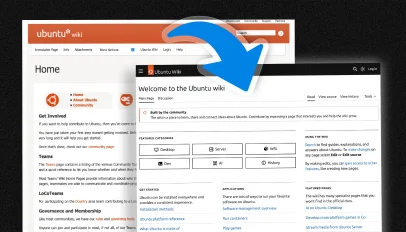 An all-new Ubuntu Wiki has gone live, giving the information hub its first substantive overhaul since 2010. The updated wiki now runs on MediaWiki, which adds a slate of modern backend and frontend features readers and editors alike will appreciate, e.g., search auto-suggest, mobile-friendly adaptations, light/dark mode, a WYSIWYG editor and more. Security was also a motivation, since the sites – there were actually two wikis – ran on an old stack tied Python 2, leaving it exposed to vulnerabilities. Ubuntu's new wiki will serve a different role to the old one. In years past, the Ubuntu Wiki was used to [...]
You're reading Ubuntu wiki gets its first overhaul in 16 years , a blog post from OMG! Ubuntu . Do not reproduce elsewhere without permission.
Categories: News, Ubuntu, wiki
Source: https://www.omgubuntu.co.uk/2026/09/ubuntu-wiki-redesign Sep 22, 2026, 09:08 PM
An all-new Ubuntu Wiki has gone live, giving the information hub its first substantive overhaul since 2010. The updated wiki now runs on MediaWiki, which adds a slate of modern backend and frontend features readers and editors alike will appreciate, e.g., search auto-suggest, mobile-friendly adaptations, light/dark mode, a WYSIWYG editor and more. Security was also a motivation, since the sites – there were actually two wikis – ran on an old stack tied Python 2, leaving it exposed to vulnerabilities. Ubuntu's new wiki will serve a different role to the old one. In years past, the Ubuntu Wiki was used to [...]You're reading Ubuntu wiki gets its first overhaul in 16 years , a blog post from OMG! Ubuntu . Do not reproduce elsewhere without permission.
Categories: News, Ubuntu, wiki
Source: https://www.omgubuntu.co.uk/2026/09/ubuntu-wiki-redesign Sep 22, 2026, 09:08 PM
#13
Ubuntu News / Obscura VPN now has a desktop...
Last post by tim - Sep 22, 2026, 07:53 PMObscura VPN now has a desktop Linux app
Obscura VPN has launched a native Linux app, giving desktop users an easier way to access it (without wrangling Wireguard configuration files). Linux isn't short of VPN providers, but Obscura, founded by former Bitcoin Core contributor Carl Dong, has a different pitch to most. Rather than your traffic being routed through a single provider, Obscura VPN uses a two-step relay: it acts as the 'entry node' (seeing your original IP address) while another VPN provider, Mullvad, acts as the 'exit node' (the websites you visit). Obscura's Linux app also supports the QUIC-based stealth protocol, which disguises your VPN connection as [...]
You're reading Obscura VPN now has a desktop Linux app , a blog post from OMG! Ubuntu . Do not reproduce elsewhere without permission.
Categories: News, Obscura VPN, Privacy Tools, VPN
Source: https://www.omgubuntu.co.uk/2026/09/obscura-vpn-linux-app Sep 22, 2026, 07:50 PM
Obscura VPN has launched a native Linux app, giving desktop users an easier way to access it (without wrangling Wireguard configuration files). Linux isn't short of VPN providers, but Obscura, founded by former Bitcoin Core contributor Carl Dong, has a different pitch to most. Rather than your traffic being routed through a single provider, Obscura VPN uses a two-step relay: it acts as the 'entry node' (seeing your original IP address) while another VPN provider, Mullvad, acts as the 'exit node' (the websites you visit). Obscura's Linux app also supports the QUIC-based stealth protocol, which disguises your VPN connection as [...]
You're reading Obscura VPN now has a desktop Linux app , a blog post from OMG! Ubuntu . Do not reproduce elsewhere without permission.
Categories: News, Obscura VPN, Privacy Tools, VPN
Source: https://www.omgubuntu.co.uk/2026/09/obscura-vpn-linux-app Sep 22, 2026, 07:50 PM
#14
Ubuntu Blog / Attach an Ubuntu Pro subscrip...
Last post by tim - Sep 22, 2026, 07:48 PMAttach an Ubuntu Pro subscription to your AWS Image Builder image
We are pleased to announce that you can now attach an Ubuntu Pro subscription directly to any base image in AWS Image Builder, allowing you to create enterprise-grade custom images from the get go.
Why this is important
Until now, getting Ubuntu Pro into a custom AMI (Amazon Machine Image) meant either starting from an Ubuntu Pro base image or manually applying a token during the build. You can now attach an Ubuntu Pro subscription to any base image directly in your build pipeline even if the base image is a non-Ubuntu Linux image.
This unlocks simpler and more flexible AMI builds: add Ubuntu Pro as just another component to the recipe, with no manual steps required. This makes Ubuntu Pro straightforward to integrate into CI/CD pipelines and automated provisioning workflows.
Note: Attaching Ubuntu Pro to a non-Ubuntu host only licenses the cluster to run Ubuntu Pro containers. It does not give the host access to Ubuntu Pro services like Expanded Security Maintenance, compliance hardening, or Kernel live patching.
Before you begin
Make sure you have the following in place:
Step 1: Subscribe to the marketplace listing
Subscribe to the component that matches your target architecture:
You can do this using the AWS Web Console or the AWS CLI. The overall flow is the same:
If you are using the AWS Web console, open the Source dropdown and select AWS Marketplace. This will display all available Marketplace components. Search for Ubuntu Pro and select the component that matches your base AMI architecture (AMD64 or ARM64).
If you are using AWS CLI, you will need to take note of the Ubuntu Pro component ARN to use it in your API call.
Step 3: Continue with the rest of the details as usual
The next step should be familiar: configure custom workflows, infrastructure details, and distribution settings.
Step 4: Build and distribute
Once you have added the Ubuntu Pro component to your recipe, the rest of the workflow follows the instructions of the standard Image Builder:
Once the image is built, the Ubuntu Pro subscription will be attached to the resulting AMI as instance metadata. If your base image is Ubuntu and the Pro client is installed, the default Ubuntu Pro services will be activated on the next boot.
If you want to learn more in detail about how to build a recipe with the Ubuntu Pro component, read more in our official documentation page .
Validating your license
To confirm the Ubuntu Pro license was attached correctly, check whether the right Marketplace product code is present on your AMI.
Using the AWS console
Go to EC2 → AMIs, select your AMI, and look at the Product codes field in the details panel below. You should see one of the following:
aws ec2 describe-images \
--owners self \
--query 'Images[*].{ImageId: ImageId, Name: Name, ProductCodes: ProductCodes[*].ProductCodeId}' \
--output text
Learn more
We are pleased to announce that you can now attach an Ubuntu Pro subscription directly to any base image in AWS Image Builder, allowing you to create enterprise-grade custom images from the get go.
Categories: AWS, AWS EC2, Ubuntu Pro
Source: https://ubuntu.com//blog/attach-ubuntu-pro-aws-image-builder Sep 21, 2026, 07:35 PM
We are pleased to announce that you can now attach an Ubuntu Pro subscription directly to any base image in AWS Image Builder, allowing you to create enterprise-grade custom images from the get go.
Why this is important
Until now, getting Ubuntu Pro into a custom AMI (Amazon Machine Image) meant either starting from an Ubuntu Pro base image or manually applying a token during the build. You can now attach an Ubuntu Pro subscription to any base image directly in your build pipeline even if the base image is a non-Ubuntu Linux image.
This unlocks simpler and more flexible AMI builds: add Ubuntu Pro as just another component to the recipe, with no manual steps required. This makes Ubuntu Pro straightforward to integrate into CI/CD pipelines and automated provisioning workflows.
Note: Attaching Ubuntu Pro to a non-Ubuntu host only licenses the cluster to run Ubuntu Pro containers. It does not give the host access to Ubuntu Pro services like Expanded Security Maintenance, compliance hardening, or Kernel live patching.
Before you begin
Make sure you have the following in place:
- An AWS account with permissions to use EC2 Image Builder and AWS Marketplace.
- IAM permissions which allow Image Builder to access Marketplace components (imagebuilder:GetComponent, aws-marketplace:Subscribe).
- A base image ready to use (EC2 Managed image, Marketplace AMI, or a custom AMI).
- If your base image is Ubuntu, ubuntu-pro-client should be installed for the Pro client to activate services on first boot.
Step 1: Subscribe to the marketplace listing
Subscribe to the component that matches your target architecture:
- Ubuntu Pro subscription for EC2 Image Builder (AMD64)
- Ubuntu Pro subscription for EC2 Image Builder (ARM64)
You can do this using the AWS Web Console or the AWS CLI. The overall flow is the same:
- Create an image pipeline (or open an existing one).
- Create a new recipe or edit an existing one:
- Select a base image (EC2 Managed image, Marketplace AMI, or a custom image).
- Select the image name (the operating system to use as a base).
- Add user data if needed.
- Add your components – this is where the Upgrade to Ubuntu Pro component comes in.
If you are using the AWS Web console, open the Source dropdown and select AWS Marketplace. This will display all available Marketplace components. Search for Ubuntu Pro and select the component that matches your base AMI architecture (AMD64 or ARM64).
If you are using AWS CLI, you will need to take note of the Ubuntu Pro component ARN to use it in your API call.
Step 3: Continue with the rest of the details as usual
The next step should be familiar: configure custom workflows, infrastructure details, and distribution settings.
Step 4: Build and distribute
Once you have added the Ubuntu Pro component to your recipe, the rest of the workflow follows the instructions of the standard Image Builder:
- Add any additional components for your own configurations and deployments.
- Configure a distribution setting (regions, AMI name, etc.).
- Configure a test pipeline (optional but recommended).
- Run the pipeline and let Image Builder produce the image.
Once the image is built, the Ubuntu Pro subscription will be attached to the resulting AMI as instance metadata. If your base image is Ubuntu and the Pro client is installed, the default Ubuntu Pro services will be activated on the next boot.
If you want to learn more in detail about how to build a recipe with the Ubuntu Pro component, read more in our official documentation page .
Validating your license
To confirm the Ubuntu Pro license was attached correctly, check whether the right Marketplace product code is present on your AMI.
Using the AWS console
Go to EC2 → AMIs, select your AMI, and look at the Product codes field in the details panel below. You should see one of the following:
- Marketplace:9bztusbna2lfuk6zw7upzdvsv — AMD64 images
- Marketplace:291iwywwdb7ujmih1x7z4l3my — Graviton (ARM64) images
aws ec2 describe-images \
--owners self \
--query 'Images[*].{ImageId: ImageId, Name: Name, ProductCodes: ProductCodes[*].ProductCodeId}' \
--output text
Learn more
- Ubuntu Documentation for EC2 Image Builder Components
- AWS EC2 Image Builder Documentation
- AWS Marketplace Premium Components
- Ubuntu Pro on AWS
We are pleased to announce that you can now attach an Ubuntu Pro subscription directly to any base image in AWS Image Builder, allowing you to create enterprise-grade custom images from the get go.
Categories: AWS, AWS EC2, Ubuntu Pro
Source: https://ubuntu.com//blog/attach-ubuntu-pro-aws-image-builder Sep 21, 2026, 07:35 PM
#15
Ubuntu Blog / Beyond the 10-year mark: Exte...
Last post by tim - Sep 22, 2026, 07:48 PMBeyond the 10-year mark: Extending Ubuntu Pro 16.04 LTS security coverage
A decade ago, Canonical launched Ubuntu 16.04 LTS (codenamed "Xenial Xerus"). As a Long-Term Support (LTS) release, it comes with 5 years of standard security coverage, which is doubled to a total of 10 years through Expanded Security Maintenance (ESM) for users with an Ubuntu Pro subscription.
As of April 30, 2026, the 10-year ESM coverage for Ubuntu 16.04 LTS, under Ubuntu Pro, has officially reached its end of support.
While Ubuntu 16.04 LTS images can still be launched on the public clouds, they are now marked as deprecated and will no longer receive any security patches, bug fixes, or maintenance updates. There are two paths you can follow to keep your Ubuntu estate security maintained.
Path 1: Upgrade to a newer supported Ubuntu LTS
Canonical strongly recommends migrating workloads to a newer, supported LTS version (such as 22.04 LTS, 24.04 LTS or 26.04 LTS) to benefit from modern security frameworks, updated software stacks, and performance improvements. There are two options when upgrading:
We understand that complex enterprise architectures, legacy applications, and regulatory dependencies can make immediate migration impossible. If you cannot redeploy your workloads right away, Canonical offers a further five years of security maintenance and support with the Legacy add-on on top of an active Ubuntu Pro subscription.
The Ubuntu Pro Legacy add-on brings the total lifecycle of the release to 15 years. This add-on ensures your Ubuntu 16.04 LTS environments continue to receive critical security patches until 2031 – giving you time to safely plan and execute your migration strategy.
Leaving your infrastructure on an unsupported operating system can expose you to security threats. Take control of your migration timeline today:
A decade ago, Canonical launched Ubuntu 16.04 LTS (codenamed "Xenial Xerus"). As a Long-Term Support (LTS) release, it comes with 5 years of standard security coverage, which is doubled to a total of 10 years through Expanded Security Maintenance (ESM) for users with an Ubuntu Pro subscription.
Categories: AWS, AWS EC2, Ubuntu Pro
Source: https://ubuntu.com//blog/extending-ubuntu-pro-16-04-coverage Sep 17, 2026, 10:46 PM
A decade ago, Canonical launched Ubuntu 16.04 LTS (codenamed "Xenial Xerus"). As a Long-Term Support (LTS) release, it comes with 5 years of standard security coverage, which is doubled to a total of 10 years through Expanded Security Maintenance (ESM) for users with an Ubuntu Pro subscription.
As of April 30, 2026, the 10-year ESM coverage for Ubuntu 16.04 LTS, under Ubuntu Pro, has officially reached its end of support.
While Ubuntu 16.04 LTS images can still be launched on the public clouds, they are now marked as deprecated and will no longer receive any security patches, bug fixes, or maintenance updates. There are two paths you can follow to keep your Ubuntu estate security maintained.
Path 1: Upgrade to a newer supported Ubuntu LTS
Canonical strongly recommends migrating workloads to a newer, supported LTS version (such as 22.04 LTS, 24.04 LTS or 26.04 LTS) to benefit from modern security frameworks, updated software stacks, and performance improvements. There are two options when upgrading:
- Fresh installation: Redeploying your workloads on a brand-new instance of a modern Ubuntu LTS ensures a clean slate and optimal configuration.
- In-place migration: If redeployment isn't immediately feasible, you can perform an upgrade on your existing instances. Learn how to perform an in-place migration by reading our Ubuntu LTS Upgrade Guide .
We understand that complex enterprise architectures, legacy applications, and regulatory dependencies can make immediate migration impossible. If you cannot redeploy your workloads right away, Canonical offers a further five years of security maintenance and support with the Legacy add-on on top of an active Ubuntu Pro subscription.
The Ubuntu Pro Legacy add-on brings the total lifecycle of the release to 15 years. This add-on ensures your Ubuntu 16.04 LTS environments continue to receive critical security patches until 2031 – giving you time to safely plan and execute your migration strategy.
- How to get it: If you need to keep running Ubuntu 16.04 LTS securely, contact the Canonical team directly via the Canonical Support Form to get the Legacy add-on.
Leaving your infrastructure on an unsupported operating system can expose you to security threats. Take control of your migration timeline today:
- Assess your inventory: Identify any remaining Ubuntu 16.04 LTS machines or images in your environment.
- Choose your path: Begin scheduling upgrades to a newer LTS, or bridge the gap securely with Ubuntu Pro and a Legacy add-on.
- Read the full announcement: Learn more about how Canonical is expanding total coverage for legacy releases in our official announcement .
A decade ago, Canonical launched Ubuntu 16.04 LTS (codenamed "Xenial Xerus"). As a Long-Term Support (LTS) release, it comes with 5 years of standard security coverage, which is doubled to a total of 10 years through Expanded Security Maintenance (ESM) for users with an Ubuntu Pro subscription.
Categories: AWS, AWS EC2, Ubuntu Pro
Source: https://ubuntu.com//blog/extending-ubuntu-pro-16-04-coverage Sep 17, 2026, 10:46 PM
#16
Ubuntu Blog / Android™ development shouldn’...
Last post by tim - Sep 22, 2026, 07:48 PMAndroid™ development shouldn't start with a physical device
How on-demand Android environments lay the foundation for Android engineering
Software engineering has evolved dramatically over the last decade. Development environments that once depended on dedicated hardware have become resources that can be provisioned, configured, and removed on demand.
Infrastructure is now expected to be reproducible, automated, and integrated into continuous development workflows. However, Android has largely remained an exception.
Many Android workflows still rely on physical devices or locally managed emulators. Here's the typical flow:
These approaches are familiar, and they can work well for small teams. However, as projects grow, hardware must be managed and shared. Environments gradually diverge, and reproducing an issue can depend as much on finding the right device as on finding the bug itself.
Before proceeding, a quick note on terminology. In this blog, a "physical device" means a phone, development board, automotive bench, or any other dedicated Android target. "Target hardware" refers to the real components themselves, such as sensors, peripherals, radios, GPUs, or vehicle interfaces whose specific behaviors must eventually be validated on the final product. Both are specific forms of physical hardware.
Physical hardware will always have an important role in Android development. But it should not be the starting point for every test, investigation, or validation workflow.
The challenge is not Android itself. It is that Android is still often treated as a dedicated physical asset rather than as a programmable part of the wider engineering infrastructure. This is beginning to change.
From devices to environments
Modern infrastructure platforms are built around a simple principle: resources should be requested by workflows rather than handled manually. Their value comes from being provisioned automatically, configured consistently, and removed when they are no longer required. Android should follow the same model.
Instead of asking someone to prepare a phone or start an emulator, a workflow should be able to request an Android environment with a known configuration, use it to perform a task, collect the results, and release it when the work is complete.
This is the approach we have taken with Anbox Cloud.
Anbox Cloud runs complete Android systems as managed containers or virtual machines on supported cloud, edge, or bare-metal infrastructure. This moves routine Android execution away from dedicated physical devices, while retaining real target hardware for the validation that genuinely depends on it.
The purpose of Anbox Cloud is not to reproduce every physical characteristic of the final product. It is to containerize or virtualize the Android execution environment so that development, testing, debugging, and streaming workflows do not each require their own dedicated device.
With Anbox Cloud, teams can create, configure, access, stream, copy, and remove Android instances programmatically. Containerized instances support application-oriented workloads where density and efficiency matter, while virtualized instances support workloads that require a complete Android system inside a virtual machine.
Whether the environment is used for application testing, streaming, platform validation, or Android Automotive development, the same consistent lifecycle applies: request, configure, use, collect, and release. Android capacity is provided exactly when the workflow needs it rather than reserved manually in advance.
A repeatable Android lifecycle
Android projects vary considerably, but their workflows often follow the same sequence.With Anbox Cloud, a workflow can:
Treating this lifecycle as code rather than as a manual procedure is what makes the Android environment programmable.
A more efficient, timely way to build
Teams can manage the Android lifecycle with Anbox Cloud using the Anbox Management Client, the AMS HTTP API, or SDKs. This allows Android environment management to be integrated into existing development tools, automation platforms, and CI systems instead of being designed around manually prepared devices or local emulators.
Making the lifecycle programmable also makes its configuration explicit. The Android image, application version, display settings, resource allocation, input data, expected outputs, and cleanup behavior can all become part of the workflow. Every execution begins from a defined configuration rather than undocumented setup, steps, or settings that exist only in someone's local environment.
This makes the lifecycle a lot smoother:
The value is not simply that an API can start Android. It is that developers, QA engineers, CI systems, and support teams can repeatedly create the same environment from the same definition. When a problem occurs, teams can identify the configuration that produced it, rather than trying to determine which manually prepared device was used.
This same operating model also supports interactive work. An environment can be created automatically and still be accessed through ADB, shell, or browser-based streaming when human investigation is required. Automation and interactive access are not separate approaches. They are different ways of working with the same environment.
Persistence also becomes an explicit workflow decision. Instead of allowing long-lived devices to accumulate installed applications, cached data, logged-in accounts, and undocumented changes, each execution can begin from a clean environment. When persistence is required, teams can copy an instance, preserve its data, or publish a configured environment for reuse.
This makes Android environments easier to understand, reproduce, and trust.
Removing hardware from the critical path
By moving routine Android execution to managed containers and virtual machines, Anbox Cloud turns Android from a scarce physical asset into programmable engineering infrastructure. This enables repeatable CI, QA, and support workflows while reserving target hardware for validation that genuinely depends on it.
Automation is the first step. However, once teams can launch one Android environment reliably, the next challenge is no longer how to prepare an environment. It is how to make hundreds or thousands of environments available efficiently without simply building a larger device lab.
That is where scaling becomes the next logical step.
In our next article, we will look at how Android teams can scale development without scaling hardware.
Learn more about Anbox Cloud or contact our team: https://canonical.com/anbox-cloud
How on-demand Android environments lay the foundation for Android engineering Software engineering has evolved dramatically over the last decade. Development environments that once depended on dedicated hardware have become resources that can be provisioned, configured, and removed on demand. Infrastructure is now expected to be reproducible, automated, and integrated into continuous development workflows. However, Android [...]
Categories: Anbox, anbox cloud, Anbox Cloud Appliance
Source: https://ubuntu.com//blog/android-development-shouldnt-start-with-a-physical-device Sep 17, 2026, 03:43 PM
How on-demand Android environments lay the foundation for Android engineering
Software engineering has evolved dramatically over the last decade. Development environments that once depended on dedicated hardware have become resources that can be provisioned, configured, and removed on demand.
Infrastructure is now expected to be reproducible, automated, and integrated into continuous development workflows. However, Android has largely remained an exception.
Many Android workflows still rely on physical devices or locally managed emulators. Here's the typical flow:
- A developer connects a phone to reproduce an issue.
- A QA engineer then reserves a device from a shared lab.
- A platform team maintains development boards to validate new Android builds.
These approaches are familiar, and they can work well for small teams. However, as projects grow, hardware must be managed and shared. Environments gradually diverge, and reproducing an issue can depend as much on finding the right device as on finding the bug itself.
Before proceeding, a quick note on terminology. In this blog, a "physical device" means a phone, development board, automotive bench, or any other dedicated Android target. "Target hardware" refers to the real components themselves, such as sensors, peripherals, radios, GPUs, or vehicle interfaces whose specific behaviors must eventually be validated on the final product. Both are specific forms of physical hardware.
Physical hardware will always have an important role in Android development. But it should not be the starting point for every test, investigation, or validation workflow.
The challenge is not Android itself. It is that Android is still often treated as a dedicated physical asset rather than as a programmable part of the wider engineering infrastructure. This is beginning to change.
From devices to environments
Modern infrastructure platforms are built around a simple principle: resources should be requested by workflows rather than handled manually. Their value comes from being provisioned automatically, configured consistently, and removed when they are no longer required. Android should follow the same model.
Instead of asking someone to prepare a phone or start an emulator, a workflow should be able to request an Android environment with a known configuration, use it to perform a task, collect the results, and release it when the work is complete.
This is the approach we have taken with Anbox Cloud.
Anbox Cloud runs complete Android systems as managed containers or virtual machines on supported cloud, edge, or bare-metal infrastructure. This moves routine Android execution away from dedicated physical devices, while retaining real target hardware for the validation that genuinely depends on it.
The purpose of Anbox Cloud is not to reproduce every physical characteristic of the final product. It is to containerize or virtualize the Android execution environment so that development, testing, debugging, and streaming workflows do not each require their own dedicated device.
With Anbox Cloud, teams can create, configure, access, stream, copy, and remove Android instances programmatically. Containerized instances support application-oriented workloads where density and efficiency matter, while virtualized instances support workloads that require a complete Android system inside a virtual machine.
Whether the environment is used for application testing, streaming, platform validation, or Android Automotive development, the same consistent lifecycle applies: request, configure, use, collect, and release. Android capacity is provided exactly when the workflow needs it rather than reserved manually in advance.
A repeatable Android lifecycle
Android projects vary considerably, but their workflows often follow the same sequence.With Anbox Cloud, a workflow can:
- Request an Android instance from a known image.
- Configure it with the required application, resources, settings, user data, or test parameters.
- Use it through ADB, shell access, browser-based streaming, or an automated test runner.
- Collect logs, screenshots, test reports, recordings, or other outputs.
- Release the instance or preserve it intentionally for further investigation.
Treating this lifecycle as code rather than as a manual procedure is what makes the Android environment programmable.
A more efficient, timely way to build
Teams can manage the Android lifecycle with Anbox Cloud using the Anbox Management Client, the AMS HTTP API, or SDKs. This allows Android environment management to be integrated into existing development tools, automation platforms, and CI systems instead of being designed around manually prepared devices or local emulators.
Making the lifecycle programmable also makes its configuration explicit. The Android image, application version, display settings, resource allocation, input data, expected outputs, and cleanup behavior can all become part of the workflow. Every execution begins from a defined configuration rather than undocumented setup, steps, or settings that exist only in someone's local environment.
This makes the lifecycle a lot smoother:
- A CI job can launch an environment, execute a test suite, collect the results, and remove the instance automatically.
- A QA engineer can recreate the same environment to investigate a failure.
- A support engineer can launch a temporary interactive session to reproduce a customer issue.
The value is not simply that an API can start Android. It is that developers, QA engineers, CI systems, and support teams can repeatedly create the same environment from the same definition. When a problem occurs, teams can identify the configuration that produced it, rather than trying to determine which manually prepared device was used.
This same operating model also supports interactive work. An environment can be created automatically and still be accessed through ADB, shell, or browser-based streaming when human investigation is required. Automation and interactive access are not separate approaches. They are different ways of working with the same environment.
Persistence also becomes an explicit workflow decision. Instead of allowing long-lived devices to accumulate installed applications, cached data, logged-in accounts, and undocumented changes, each execution can begin from a clean environment. When persistence is required, teams can copy an instance, preserve its data, or publish a configured environment for reuse.
This makes Android environments easier to understand, reproduce, and trust.
Removing hardware from the critical path
By moving routine Android execution to managed containers and virtual machines, Anbox Cloud turns Android from a scarce physical asset into programmable engineering infrastructure. This enables repeatable CI, QA, and support workflows while reserving target hardware for validation that genuinely depends on it.
Automation is the first step. However, once teams can launch one Android environment reliably, the next challenge is no longer how to prepare an environment. It is how to make hundreds or thousands of environments available efficiently without simply building a larger device lab.
That is where scaling becomes the next logical step.
In our next article, we will look at how Android teams can scale development without scaling hardware.
Learn more about Anbox Cloud or contact our team: https://canonical.com/anbox-cloud
How on-demand Android environments lay the foundation for Android engineering Software engineering has evolved dramatically over the last decade. Development environments that once depended on dedicated hardware have become resources that can be provisioned, configured, and removed on demand. Infrastructure is now expected to be reproducible, automated, and integrated into continuous development workflows. However, Android [...]
Categories: Anbox, anbox cloud, Anbox Cloud Appliance
Source: https://ubuntu.com//blog/android-development-shouldnt-start-with-a-physical-device Sep 17, 2026, 03:43 PM
#17
Ubuntu News / Ubuntu cloud images dropped a...
Last post by tim - Sep 22, 2026, 07:48 PMUbuntu cloud images dropped another package by accident
 Another package went missing from Ubuntu 26.04 LTS's minimal cloud images, this time xxd , a CLI tool for viewing files as hexadecimals. It's the second time this has happened, following the accidental removal of curl I reported on in August. Both packages vanished for the same reason. When Canonical dropped the pollinate tool, which was used to generate 'randomness' during boot, it rejigged the dependency chain in the image 'seed'. Packages that got pulled in by it, no longer were. While xxd wasn't present on the initial set of image, it was still available to install from the Ubuntu's archive. Canonical has [...]
You're reading Ubuntu cloud images dropped another package by accident , a blog post from OMG! Ubuntu . Do not reproduce elsewhere without permission.
Categories: News, ubuntu server, xxd
Source: https://www.omgubuntu.co.uk/2026/09/ubuntu-server-xxd-missing Sep 22, 2026, 04:53 AM
Another package went missing from Ubuntu 26.04 LTS's minimal cloud images, this time xxd , a CLI tool for viewing files as hexadecimals. It's the second time this has happened, following the accidental removal of curl I reported on in August. Both packages vanished for the same reason. When Canonical dropped the pollinate tool, which was used to generate 'randomness' during boot, it rejigged the dependency chain in the image 'seed'. Packages that got pulled in by it, no longer were. While xxd wasn't present on the initial set of image, it was still available to install from the Ubuntu's archive. Canonical has [...]You're reading Ubuntu cloud images dropped another package by accident , a blog post from OMG! Ubuntu . Do not reproduce elsewhere without permission.
Categories: News, ubuntu server, xxd
Source: https://www.omgubuntu.co.uk/2026/09/ubuntu-server-xxd-missing Sep 22, 2026, 04:53 AM
#18
Ubuntu News / Wallpapi gives you a cooler w...
Last post by tim - Sep 22, 2026, 07:48 PMWallpapi gives you a cooler way to change wallpaper on GNOME
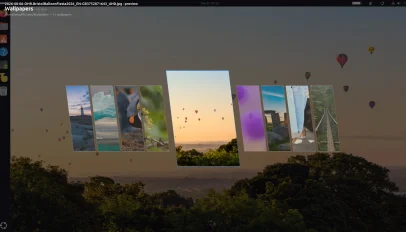 Wallpapi is an Omarchy-inspired wallpaper switcher for GNOME desktops that offers a slicker. When installed, it lets you "browse a folder of wallpapers as a full-screen carousel of parallelogram cards". As you page through available options, the focused image is previewed as your wallpaper in the background, so you can see it larger, which is pretty cool. When you spot the drape you want, you hit Enter to set it as the desktop background. Choices are scheme-aware. If a light or dark variant is available, Wallpapi will set the correct version of an image per your system dark mode preference. [...]
You're reading Wallpapi gives you a cooler way to change wallpaper on GNOME , a blog post from OMG! Ubuntu . Do not reproduce elsewhere without permission.
Categories: News, GNOME Extensions, Omarchy, wallpaper
Source: https://www.omgubuntu.co.uk/2026/09/wallpapi-wallpaper-gnome-extension Sep 22, 2026, 03:28 AM
Wallpapi is an Omarchy-inspired wallpaper switcher for GNOME desktops that offers a slicker. When installed, it lets you "browse a folder of wallpapers as a full-screen carousel of parallelogram cards". As you page through available options, the focused image is previewed as your wallpaper in the background, so you can see it larger, which is pretty cool. When you spot the drape you want, you hit Enter to set it as the desktop background. Choices are scheme-aware. If a light or dark variant is available, Wallpapi will set the correct version of an image per your system dark mode preference. [...]You're reading Wallpapi gives you a cooler way to change wallpaper on GNOME , a blog post from OMG! Ubuntu . Do not reproduce elsewhere without permission.
Categories: News, GNOME Extensions, Omarchy, wallpaper
Source: https://www.omgubuntu.co.uk/2026/09/wallpapi-wallpaper-gnome-extension Sep 22, 2026, 03:28 AM
#19
Ubuntu News / Sublime Text gains new C# hig...
Last post by tim - Sep 22, 2026, 07:48 PMSublime Text gains new C# highlighter, file icon themes
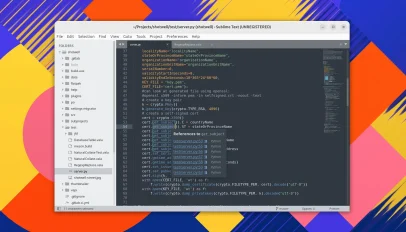 A new version of Sublime Text is out – the first major update to the cross-platform (and closed-source) text editor since May 2025. Sublime Text v4213 makes Python 3.14 the default (replacing v3.8). The editor still ships Python 3.3 – ancient as it is – but disabled by default. It will be removed in a future update, but sticks around a little longer incase of plugin compatibility issues. New features in this update includes a rewritten C# syntax highlighter, alongside more general, if unspecified, 'improvements' to syntax highlighting. Sublime Text also introduces support for file icon themes. These let users [...]
You're reading Sublime Text gains new C# highlighter, file icon themes , a blog post from OMG! Ubuntu . Do not reproduce elsewhere without permission.
Categories: News, App Updates, sublime text
Source: https://www.omgubuntu.co.uk/2026/09/sublime-text-python-3-14-update Sep 21, 2026, 07:51 PM
A new version of Sublime Text is out – the first major update to the cross-platform (and closed-source) text editor since May 2025. Sublime Text v4213 makes Python 3.14 the default (replacing v3.8). The editor still ships Python 3.3 – ancient as it is – but disabled by default. It will be removed in a future update, but sticks around a little longer incase of plugin compatibility issues. New features in this update includes a rewritten C# syntax highlighter, alongside more general, if unspecified, 'improvements' to syntax highlighting. Sublime Text also introduces support for file icon themes. These let users [...]You're reading Sublime Text gains new C# highlighter, file icon themes , a blog post from OMG! Ubuntu . Do not reproduce elsewhere without permission.
Categories: News, App Updates, sublime text
Source: https://www.omgubuntu.co.uk/2026/09/sublime-text-python-3-14-update Sep 21, 2026, 07:51 PM
#20
Ubuntu News / GNOME saves blushes by replac...
Last post by tim - Sep 22, 2026, 07:48 PMGNOME saves blushes by replacing 'inappropriate' screenshot sound
 Say goodbye to people thinking you're a creep next time you take a desktop screenshot in a public space, as GNOME 51 has changed the sound effect that plays when you do. For a while now, when you screen grab your desktop or an app window, the accompanying sound effect is a camera shutter, like the one you hear when you take a photo on a smartphone. Cute in the privacy of your own home, but less cute in a public setting like an office or café. The sound is the issue: how are people to know you're taking desktop [...]
You're reading GNOME saves blushes by replacing 'inappropriate' screenshot sound , a blog post from OMG! Ubuntu . Do not reproduce elsewhere without permission.
Categories: News, GNOME 51, gnome shell, screenshots, Ubuntu 26.10
Source: https://www.omgubuntu.co.uk/2026/09/gnome-screenshot-sound-change Sep 21, 2026, 04:39 PM
Say goodbye to people thinking you're a creep next time you take a desktop screenshot in a public space, as GNOME 51 has changed the sound effect that plays when you do. For a while now, when you screen grab your desktop or an app window, the accompanying sound effect is a camera shutter, like the one you hear when you take a photo on a smartphone. Cute in the privacy of your own home, but less cute in a public setting like an office or café. The sound is the issue: how are people to know you're taking desktop [...]You're reading GNOME saves blushes by replacing 'inappropriate' screenshot sound , a blog post from OMG! Ubuntu . Do not reproduce elsewhere without permission.
Categories: News, GNOME 51, gnome shell, screenshots, Ubuntu 26.10
Source: https://www.omgubuntu.co.uk/2026/09/gnome-screenshot-sound-change Sep 21, 2026, 04:39 PM