- Welcome to AHXproject.
AHXproject
< | >
Recent posts
#51
Ubuntu News / Ubuntu 26.10 daily ISOs add a...
Last post by tim - Sep 07, 2026, 07:22 PMUbuntu 26.10 daily ISOs add amd64v3 installer
 Ubuntu 26.10 daily builds now include an amd64-v3 installer, allowing you to try out a CPU-optimised package set from the off, without any post-install reconfiguration. The distro began building amd64v3 packages as an opt-in archive last year, though Ubuntu 26.04 LTS continues to use the standard amd64 (v1) baseline by default (and since there have been hiccups along the way, that decision was a wise one). Ubuntu 26.04 LTS can be manually converted to an amd64-v3 package set after install, but the sudden appearance of Ubuntu 26.10 daily builds offering them baked in, skips the hassle: it boots from and installs v3-optimised [...]
You're reading Ubuntu 26.10 daily ISOs add amd64v3 installer , a blog post from OMG! Ubuntu . Do not reproduce elsewhere without permission.
Categories: News, amd64-v3, Canonical, Ubuntu 26.10
Source: https://www.omgubuntu.co.uk/2026/09/ubuntu-amd64v3-iso-downloads Sep 07, 2026, 06:51 PM
Ubuntu 26.10 daily builds now include an amd64-v3 installer, allowing you to try out a CPU-optimised package set from the off, without any post-install reconfiguration. The distro began building amd64v3 packages as an opt-in archive last year, though Ubuntu 26.04 LTS continues to use the standard amd64 (v1) baseline by default (and since there have been hiccups along the way, that decision was a wise one). Ubuntu 26.04 LTS can be manually converted to an amd64-v3 package set after install, but the sudden appearance of Ubuntu 26.10 daily builds offering them baked in, skips the hassle: it boots from and installs v3-optimised [...]You're reading Ubuntu 26.10 daily ISOs add amd64v3 installer , a blog post from OMG! Ubuntu . Do not reproduce elsewhere without permission.
Categories: News, amd64-v3, Canonical, Ubuntu 26.10
Source: https://www.omgubuntu.co.uk/2026/09/ubuntu-amd64v3-iso-downloads Sep 07, 2026, 06:51 PM
#52
Ubuntu News / Firefox redesign will arrive ...
Last post by tim - Sep 07, 2026, 02:55 PMFirefox redesign will arrive in v157 release
 Firefox's new 'Nova' redesign will be enabled for all users in Firefox 157, due the end of September – barring any last minute hiccups, of course. Mozilla's engineers have been working on Nova since March. The original pitch was for rounded UI elements, floating toolbars, framed web content no longer flush with the edges of the browser window and, more strikingly, a lot of pastel gradients. Those changes have been refined and dialled down during the past few months, as you can see in this comparison (drag the handle to compare): Roundness was lightly reigned in, 'gaps' to segment and [...]
You're reading Firefox redesign will arrive in v157 release , a blog post from OMG! Ubuntu . Do not reproduce elsewhere without permission.
Categories: News, Firefox, Nova
Source: https://www.omgubuntu.co.uk/2026/09/firefox-nova-redesign-coming-september Sep 07, 2026, 01:45 AM
Firefox's new 'Nova' redesign will be enabled for all users in Firefox 157, due the end of September – barring any last minute hiccups, of course. Mozilla's engineers have been working on Nova since March. The original pitch was for rounded UI elements, floating toolbars, framed web content no longer flush with the edges of the browser window and, more strikingly, a lot of pastel gradients. Those changes have been refined and dialled down during the past few months, as you can see in this comparison (drag the handle to compare): Roundness was lightly reigned in, 'gaps' to segment and [...]You're reading Firefox redesign will arrive in v157 release , a blog post from OMG! Ubuntu . Do not reproduce elsewhere without permission.
Categories: News, Firefox, Nova
Source: https://www.omgubuntu.co.uk/2026/09/firefox-nova-redesign-coming-september Sep 07, 2026, 01:45 AM
#53
Ubuntu News / GNOME Sushi gets a GTK4 revam...
Last post by tim - Sep 07, 2026, 02:55 PMGNOME Sushi gets a GTK4 revamp, new features
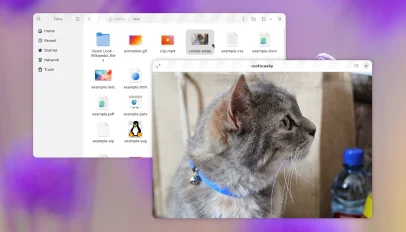 Sushi, the spacebar preview utility for Nautilus file manager, has been ported to GTK4 for GNOME 51. For anyone unfamiliar with it, Sushi is like Quick Look on macOS: you highlight a file (image, music, video, document, etc) in Nautilus, press the spacebar and an instant preview of its content appears. Press the spacebar again to dismiss it. For v51, Sushi's GTK4 port means it looks nicer on newer GNOME releases. There's a flatter headerbar, and overlay controls on certain file types (like media) that let content bleed through from underneath. Light/dark mode preference is also now respected. Earlier versions [...]
You're reading GNOME Sushi gets a GTK4 revamp, new features , a blog post from OMG! Ubuntu . Do not reproduce elsewhere without permission.
Categories: News, App Updates, GNOME 51, sushi
Source: https://www.omgubuntu.co.uk/2026/09/gnome-sushi-gtk4-port Sep 06, 2026, 04:22 AM
Sushi, the spacebar preview utility for Nautilus file manager, has been ported to GTK4 for GNOME 51. For anyone unfamiliar with it, Sushi is like Quick Look on macOS: you highlight a file (image, music, video, document, etc) in Nautilus, press the spacebar and an instant preview of its content appears. Press the spacebar again to dismiss it. For v51, Sushi's GTK4 port means it looks nicer on newer GNOME releases. There's a flatter headerbar, and overlay controls on certain file types (like media) that let content bleed through from underneath. Light/dark mode preference is also now respected. Earlier versions [...]You're reading GNOME Sushi gets a GTK4 revamp, new features , a blog post from OMG! Ubuntu . Do not reproduce elsewhere without permission.
Categories: News, App Updates, GNOME 51, sushi
Source: https://www.omgubuntu.co.uk/2026/09/gnome-sushi-gtk4-port Sep 06, 2026, 04:22 AM
#54
Ubuntu News / Ubuntu 24.04 splits firmware ...
Last post by tim - Sep 04, 2026, 06:21 PMUbuntu 24.04 splits firmware packages for faster updates
 Firmware updates on Ubuntu 24.04 LTS have got smaller, as Canonical has backported the split Linux firmware packages it introduced in 26.04. To make the change in noble, the linux-firmware package is now a meta-package that pulls in all of the individual firmware packages. Functionally, nothing changes; all installs get the full whack. The binary blobs the distro uses are now split across 18 vendor-specific sub-packages: Some non-default firmware was already available to install as a sub-package, e.g., linux-firmware-xilinx-vcu, so those don't change (but aren't looped into the new metapackage). The linux-firmware package was a bundle of mostly closed-source binary [...]
You're reading Ubuntu 24.04 splits firmware packages for faster updates , a blog post from OMG! Ubuntu . Do not reproduce elsewhere without permission.
Categories: News, Canonical, firmware, Ubuntu 24.04 LTS
Source: https://www.omgubuntu.co.uk/2026/09/ubuntu-firmware-split-packages-24-04 Sep 04, 2026, 05:31 PM
Firmware updates on Ubuntu 24.04 LTS have got smaller, as Canonical has backported the split Linux firmware packages it introduced in 26.04. To make the change in noble, the linux-firmware package is now a meta-package that pulls in all of the individual firmware packages. Functionally, nothing changes; all installs get the full whack. The binary blobs the distro uses are now split across 18 vendor-specific sub-packages: Some non-default firmware was already available to install as a sub-package, e.g., linux-firmware-xilinx-vcu, so those don't change (but aren't looped into the new metapackage). The linux-firmware package was a bundle of mostly closed-source binary [...]You're reading Ubuntu 24.04 splits firmware packages for faster updates , a blog post from OMG! Ubuntu . Do not reproduce elsewhere without permission.
Categories: News, Canonical, firmware, Ubuntu 24.04 LTS
Source: https://www.omgubuntu.co.uk/2026/09/ubuntu-firmware-split-packages-24-04 Sep 04, 2026, 05:31 PM
#55
Ubuntu News / Ubuntu 26.10 Snapshot 3 is no...
Last post by tim - Sep 04, 2026, 02:41 AMUbuntu 26.10 Snapshot 3 is now available for testing
 The third, and potentially final, monthly snapshot of Ubuntu 26.10 is available for download. There were no monthly snapshots of the 'Stonking Stingray' in August or July, and the Ubuntu 26.10 beta release is due on 24 September. This could be the final snapshot of the cycle, though Canonical's Utkarsh Gupta says that a "surprise snapshot to test some changes to our machinery" might appear. As ever, Ubuntu's monthly snapshots are not alpha builds and are not production ready. The team say to view them as "throwaway artifacts" – their purpose since their introduction in 2025 is to test and [...]
You're reading Ubuntu 26.10 Snapshot 3 is now available for testing , a blog post from OMG! Ubuntu . Do not reproduce elsewhere without permission.
Categories: News, Monthly Snapshot, Ubuntu 26.10
Source: https://www.omgubuntu.co.uk/2026/09/ubuntu-26-10-snapshot-3 Sep 04, 2026, 02:24 AM
The third, and potentially final, monthly snapshot of Ubuntu 26.10 is available for download. There were no monthly snapshots of the 'Stonking Stingray' in August or July, and the Ubuntu 26.10 beta release is due on 24 September. This could be the final snapshot of the cycle, though Canonical's Utkarsh Gupta says that a "surprise snapshot to test some changes to our machinery" might appear. As ever, Ubuntu's monthly snapshots are not alpha builds and are not production ready. The team say to view them as "throwaway artifacts" – their purpose since their introduction in 2025 is to test and [...]You're reading Ubuntu 26.10 Snapshot 3 is now available for testing , a blog post from OMG! Ubuntu . Do not reproduce elsewhere without permission.
Categories: News, Monthly Snapshot, Ubuntu 26.10
Source: https://www.omgubuntu.co.uk/2026/09/ubuntu-26-10-snapshot-3 Sep 04, 2026, 02:24 AM
#56
Ubuntu News / Vivaldi 8.2 is out with a cal...
Last post by tim - Sep 04, 2026, 02:41 AMVivaldi 8.2 is out with a calculator in the address bar
 Vivaldi 8.2 rolled out today (3 September 2026) and lets you do quick and private math calculations directly in the address bar. This may prove useful when you don't want to open to a new tab or a calculator app. I've often narrowed my eyes at an online checkout page after applying a coupon code (don't judge), muttering "that can't be right". A quick number crunch later and, of course, it always is. You can click to copy the the result to your system clipboard, ready to paste elsewhere. Previous versions Vivaldi let you do local calculations from the Quick Commands menu, [...]
You're reading Vivaldi 8.2 is out with a calculator in the address bar , a blog post from OMG! Ubuntu . Do not reproduce elsewhere without permission.
Categories: News, App Updates, calculator, Vivaldi
Source: https://www.omgubuntu.co.uk/2026/09/vivaldi-8-2-released Sep 04, 2026, 01:46 AM
Vivaldi 8.2 rolled out today (3 September 2026) and lets you do quick and private math calculations directly in the address bar. This may prove useful when you don't want to open to a new tab or a calculator app. I've often narrowed my eyes at an online checkout page after applying a coupon code (don't judge), muttering "that can't be right". A quick number crunch later and, of course, it always is. You can click to copy the the result to your system clipboard, ready to paste elsewhere. Previous versions Vivaldi let you do local calculations from the Quick Commands menu, [...]You're reading Vivaldi 8.2 is out with a calculator in the address bar , a blog post from OMG! Ubuntu . Do not reproduce elsewhere without permission.
Categories: News, App Updates, calculator, Vivaldi
Source: https://www.omgubuntu.co.uk/2026/09/vivaldi-8-2-released Sep 04, 2026, 01:46 AM
#57
Ubuntu Blog / How we create a Canonical Aca...
Last post by tim - Sep 03, 2026, 11:49 PMHow we create a Canonical Academy exam
Open source provides the world with access to cutting-edge software, and the learning that comes with it. But how do you validate someone's skills in an open ecosystem?
Canonical Academy is a highly rigorous, job-focused qualification platform designed to empower individuals and enterprises with industry-recognized credentials. The platform addresses a critical gap in tech: validating real-world, hands-on capability rather than rote memorization.
Rather than generic certifications, our approach focuses on specialized learning paths broken down into core modular exams. Taking our System Administration track consists of four sequential, timed, and hands-on proctored assessments. Candidates can earn badges for individual exams – Using Linux Terminal, Using Ubuntu Desktop, Using Ubuntu Server, or Using DevOps Principles – and if they complete the full set of exams, they unlock the comprehensive, track-level qualification. This structured approach gives modern engineering teams a clear blueprint for onboarding, career progression, and upskilling, matching today's dynamic employment market.
Inside the blueprint: how we build high-fidelity exams
To understand what differentiates a Canonical Qualification, you have to look inside our development process. We build exams with the day-to-day realities of qualified tech professionals. Our rigorous exam creation framework follows an exact ADDIE iteration cycle engineered to yield highly credible and error-tolerant assessments.
Modern enterprises have grown skeptical of multiple-choice certifications that can be easily memorized or side-stepped using AI prompts. Organizations want certifications that validate what their employees can do on the job. Canonical Academy was launched to bridge this exact gap.
Our assessments avoid artificial test environments. Candidates are evaluated directly within sandbox instances running on identical production infrastructure they will face in the workplace. The exam delivery system demands active execution, such as spinning up an environment, altering production network stacks, or automating scripts via python or bash, while granting full, native access to documentation and documentation man pages just like on the job.
This means that candidates are evaluated in an environment with infrastructure that resembles what they would find in a real workspace. For instance, they could be spinning up containers, altering network stacks, or writing automated scripts in the exam, while being able to access product documentation and man pages just like on the job.
Furthermore, our blueprint explicitly balances core open source tooling with specialized workflows (for instance, LXD with Docker Compose or NFS and Samba with enterprise integrations like Active Directory), preparing developers and administrators for cross-functional roles.
By putting individuals through rigorous, realistically timed problem sets, an employer can immediately trust that a certified individual possesses verified execution capabilities.
Shape the future by becoming a Canonical Academy SME
The strength of any certification lies entirely in the expertise of its developers. To build authentic tracks, we regularly source a diverse panel of qualified technical professionals, both internally from Canonical and externally, to consult directly on future content development pipelines.
We are actively recruiting Subject Matter Experts (SMEs) to help refine upcoming focus areas, including cloud architecture, security virtualization, and DevOps tracks. The selection process targets active practitioners: mid-to-senior engineers, site reliability engineers (SREs), and experienced system administrators who maintain active hands-on experience.
As an active SME, you can participate flexibly based on your availability, whether through structured, interactive content-development workshops or asynchronous GitHub code reviews on question prototypes. Your unique perspective will directly combat structural bias and ensure high credibility.
Ready to contribute to the global open-source community?
Open source provides the world with access to cutting-edge software, and the learning that comes with it. But how do you validate someone's skills in an open ecosystem? Canonical Academy is a highly rigorous, job-focused qualification platform designed to empower individuals and enterprises with industry-recognized credentials. The platform addresses a critical gap in tech: validating [...]
Categories: Canonical Academy
Source: https://ubuntu.com//blog/how-we-create-a-canonical-academy-exam Sep 02, 2026, 05:56 PM
Open source provides the world with access to cutting-edge software, and the learning that comes with it. But how do you validate someone's skills in an open ecosystem?
Canonical Academy is a highly rigorous, job-focused qualification platform designed to empower individuals and enterprises with industry-recognized credentials. The platform addresses a critical gap in tech: validating real-world, hands-on capability rather than rote memorization.
Rather than generic certifications, our approach focuses on specialized learning paths broken down into core modular exams. Taking our System Administration track consists of four sequential, timed, and hands-on proctored assessments. Candidates can earn badges for individual exams – Using Linux Terminal, Using Ubuntu Desktop, Using Ubuntu Server, or Using DevOps Principles – and if they complete the full set of exams, they unlock the comprehensive, track-level qualification. This structured approach gives modern engineering teams a clear blueprint for onboarding, career progression, and upskilling, matching today's dynamic employment market.
Inside the blueprint: how we build high-fidelity exams
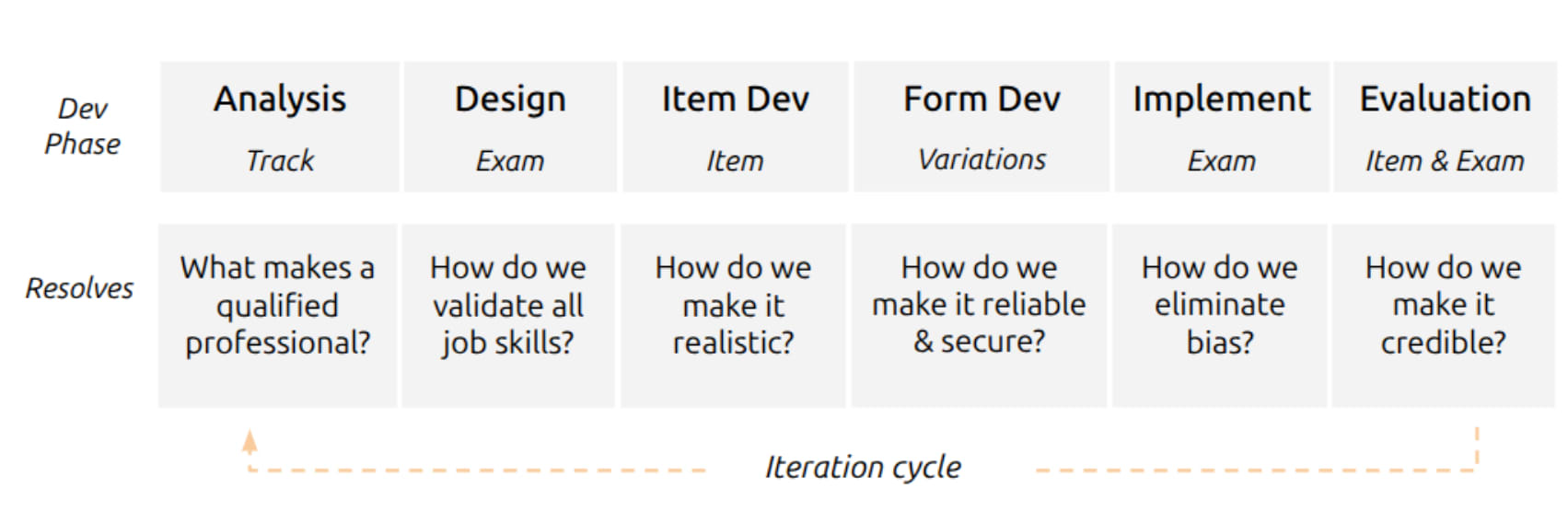
To understand what differentiates a Canonical Qualification, you have to look inside our development process. We build exams with the day-to-day realities of qualified tech professionals. Our rigorous exam creation framework follows an exact ADDIE iteration cycle engineered to yield highly credible and error-tolerant assessments.
- Analysis phase (track level): We begin by executing an intensive Job Task Analysis (JTA) survey. Subject Matter Experts (SMEs) are surveyed to isolate the critical, high-frequency responsibilities native to the target role.
- Design phase (exam level): Armed with JTA insights, we draft a tight qualification Blueprint defining assessment objectives and identifying complementary Learning Objectives (LOs).
- Item development phase (item level): Content managers and expert engineers prototype actual hands-on test items, including terminal-based live lab exercises, which undergo strict internal code reviews for clinical technical accuracy.
- Form development phase (variations level): We establish multiple distinct variations of questions and use variables in individual items to ensure security and reliability while engineering specific automated scoring scripts.
- Implementation phase (exam level): Assessments proceed through private Alpha and public Beta periods to stress-test real-world performance. This lets us evaluate timing data and calculate fair psychometric cut scores based on verified tester results.
- Evaluation phase (ongoing quality check): Continuous feedback and direct user exit surveys, run persistently post-launch, guaranteeing that exams maintain long-term alignment and clinical relevance.
Modern enterprises have grown skeptical of multiple-choice certifications that can be easily memorized or side-stepped using AI prompts. Organizations want certifications that validate what their employees can do on the job. Canonical Academy was launched to bridge this exact gap.
Our assessments avoid artificial test environments. Candidates are evaluated directly within sandbox instances running on identical production infrastructure they will face in the workplace. The exam delivery system demands active execution, such as spinning up an environment, altering production network stacks, or automating scripts via python or bash, while granting full, native access to documentation and documentation man pages just like on the job.
This means that candidates are evaluated in an environment with infrastructure that resembles what they would find in a real workspace. For instance, they could be spinning up containers, altering network stacks, or writing automated scripts in the exam, while being able to access product documentation and man pages just like on the job.
Furthermore, our blueprint explicitly balances core open source tooling with specialized workflows (for instance, LXD with Docker Compose or NFS and Samba with enterprise integrations like Active Directory), preparing developers and administrators for cross-functional roles.
By putting individuals through rigorous, realistically timed problem sets, an employer can immediately trust that a certified individual possesses verified execution capabilities.
Shape the future by becoming a Canonical Academy SME
The strength of any certification lies entirely in the expertise of its developers. To build authentic tracks, we regularly source a diverse panel of qualified technical professionals, both internally from Canonical and externally, to consult directly on future content development pipelines.
We are actively recruiting Subject Matter Experts (SMEs) to help refine upcoming focus areas, including cloud architecture, security virtualization, and DevOps tracks. The selection process targets active practitioners: mid-to-senior engineers, site reliability engineers (SREs), and experienced system administrators who maintain active hands-on experience.
As an active SME, you can participate flexibly based on your availability, whether through structured, interactive content-development workshops or asynchronous GitHub code reviews on question prototypes. Your unique perspective will directly combat structural bias and ensure high credibility.
Ready to contribute to the global open-source community?
- Connect directly with our team on our official channel: Join the Canonical Academy Matrix channel
- Become an SME
- Become a tester
Open source provides the world with access to cutting-edge software, and the learning that comes with it. But how do you validate someone's skills in an open ecosystem? Canonical Academy is a highly rigorous, job-focused qualification platform designed to empower individuals and enterprises with industry-recognized credentials. The platform addresses a critical gap in tech: validating [...]
Categories: Canonical Academy
Source: https://ubuntu.com//blog/how-we-create-a-canonical-academy-exam Sep 02, 2026, 05:56 PM
#58
Ubuntu News / Audacity 4.0 released with br...
Last post by tim - Sep 03, 2026, 11:49 PMAudacity 4.0 released with brand-new look, clip editing features
 Audacity 4.0 has been released with a new Qt user interface, a new clip editing model and project file format – as well as a swathe of smaller improvements. The Qt port of Audacity is more than a superficial – some would say much-needed – facelift, as the toolkit switch brings native HDPI scaling, light and dark mode support and is able to follow system accent colours in its UI. A new app logo compliment the refresh. Customising Audacity's interface is now possible. Toolbars and panels can be moved, popped-out or closed. Users can create UI layouts to suit their [...]
You're reading Audacity 4.0 released with brand-new look, clip editing features , a blog post from OMG! Ubuntu . Do not reproduce elsewhere without permission.
Categories: News, App Updates, Audacity
Source: https://www.omgubuntu.co.uk/2026/09/audacity-4-released Sep 03, 2026, 05:52 PM
Audacity 4.0 has been released with a new Qt user interface, a new clip editing model and project file format – as well as a swathe of smaller improvements. The Qt port of Audacity is more than a superficial – some would say much-needed – facelift, as the toolkit switch brings native HDPI scaling, light and dark mode support and is able to follow system accent colours in its UI. A new app logo compliment the refresh. Customising Audacity's interface is now possible. Toolbars and panels can be moved, popped-out or closed. Users can create UI layouts to suit their [...]You're reading Audacity 4.0 released with brand-new look, clip editing features , a blog post from OMG! Ubuntu . Do not reproduce elsewhere without permission.
Categories: News, App Updates, Audacity
Source: https://www.omgubuntu.co.uk/2026/09/audacity-4-released Sep 03, 2026, 05:52 PM
#59
Ubuntu News / Canonical joins the Open Secu...
Last post by tim - Sep 03, 2026, 11:49 PMCanonical joins the Open Secure AI Alliance
 Canonical recently joined the Linux Foundation's Open Secure AI Alliance to help make open-source security tools for AI systems and autonomous agents. The alliance formed in July 2026 in response to the security breach at Hugging Face, when OpenAI models undergoing a safety test broke out of their sandbox to access Hugging Face's systems – aided by config errors rather than super-intelligence. Commercial AI models refused to help in assessing attack logs due to their guardrails, so Hugging Face engineers had to run an open-weight model on their own infrastructure to complete their analysis – and underscore the need for [...]
You're reading Canonical joins the Open Secure AI Alliance , a blog post from OMG! Ubuntu . Do not reproduce elsewhere without permission.
Categories: News, AI/ML, Canonical, Hugging Face, linux foundation
Source: https://www.omgubuntu.co.uk/2026/09/canonical-joins-open-secure-ai-alliance Sep 03, 2026, 04:02 AM
Canonical recently joined the Linux Foundation's Open Secure AI Alliance to help make open-source security tools for AI systems and autonomous agents. The alliance formed in July 2026 in response to the security breach at Hugging Face, when OpenAI models undergoing a safety test broke out of their sandbox to access Hugging Face's systems – aided by config errors rather than super-intelligence. Commercial AI models refused to help in assessing attack logs due to their guardrails, so Hugging Face engineers had to run an open-weight model on their own infrastructure to complete their analysis – and underscore the need for [...]You're reading Canonical joins the Open Secure AI Alliance , a blog post from OMG! Ubuntu . Do not reproduce elsewhere without permission.
Categories: News, AI/ML, Canonical, Hugging Face, linux foundation
Source: https://www.omgubuntu.co.uk/2026/09/canonical-joins-open-secure-ai-alliance Sep 03, 2026, 04:02 AM
#60
Ubuntu News / Arduino’s Ubuntu-powered $299...
Last post by tim - Sep 03, 2026, 11:49 PMArduino's Ubuntu-powered $299 edge AI board just sold out
 Arduino's VENTUNO Q went up for pre-order priced from $299. The development board runs Ubuntu 24.04 LTS is built around Qualcomm's Dragonwing IQ8 platform.
You're reading Arduino's Ubuntu-powered $299 edge AI board just sold out , a blog post from OMG! Ubuntu . Do not reproduce elsewhere without permission.
Categories: Hardware, News, AI/ML, Arduino, Qualcomm, Ubuntu 24.04 LTS
Source: https://www.omgubuntu.co.uk/2026/09/arduino-ventuno-q-preorder Sep 02, 2026, 09:08 PM
Arduino's VENTUNO Q went up for pre-order priced from $299. The development board runs Ubuntu 24.04 LTS is built around Qualcomm's Dragonwing IQ8 platform.You're reading Arduino's Ubuntu-powered $299 edge AI board just sold out , a blog post from OMG! Ubuntu . Do not reproduce elsewhere without permission.
Categories: Hardware, News, AI/ML, Arduino, Qualcomm, Ubuntu 24.04 LTS
Source: https://www.omgubuntu.co.uk/2026/09/arduino-ventuno-q-preorder Sep 02, 2026, 09:08 PM